
Google stopped letting advertisers create new call-only ads in February 2026 and will stop serving existing ones by February 2027. The action to take now is straightforward: add your business phone numbers as call assets to your responsive search ads before you touch anything else. Only pause your old call-only ads once those RSAs with call assets are live, approved, and showing real performance data.
TL;DR:
- Overlap your migration by running new responsive search ads with call assets alongside existing call-only ads for at least one to two weeks to prevent drops in call volume.
- Focus on verifying each phone number and ensuring the call assets render correctly on mobile and desktop before pausing old call-only ads.
- Use call bid adjustments and targeted bidding strategies to maximize call interactions, especially during the initial migration period.
- Set a minimum call duration threshold, such as 60 to 90 seconds, to accurately count qualified leads and optimize bid strategies around high-quality calls.
- Prioritize high-volume campaigns for migration to maintain lead flow and consider professional support to handle the technical setup and strategic adjustments.
Table of Contents
- What Call-Only Ads Were and What Google Is Changing
- How to Migrate Your Call-Only Campaigns to RSAs With Call Assets
- Optimization Tactics to Protect Call Volume After Migration
- Measuring Call Quality: Duration Thresholds and Conversion Tracking
- Common Migration Pitfalls and How to Fix Them
- Preferic’s Take on Getting This Right
- Get Help Migrating Your Call Campaigns Before the Deadline
- Sources
- FAQ
What Call-Only Ads Were and What Google Is Changing
Call-only ads were a Google Ads format built for one job: getting the phone to ring. They showed up on mobile devices with a headline, a display path, and a call button in place of a clickable web link. Tap the ad, and you started a phone call instead of loading a landing page. For plumbers, dentists, roofers, and other appointment-driven businesses, that direct line from search result to phone call was the entire appeal. No form to fill out, no page to load, just a customer calling because they had an urgent need right now.
Google is retiring that standalone format in favor of call assets attached to responsive search ads. The official timeline gives advertisers a two-stage runway: the ability to create new call-only ads ended in February 2026, and Google stops serving any call-only ads at all, including ones already running, in February 2027. Your existing call-only ads can keep running until then, but you can no longer build new ones, so any new campaign or ad group needs RSAs with call assets from day one.
Call assets behave differently depending on the device, and that difference matters for your creative strategy:
- On mobile, a call asset shows a tappable call button right inside the ad, functionally similar to the old call-only format.
- On desktop, it shows a call button paired with a QR code, so a desktop searcher can scan and call from their phone instead of typing a number.
- Call assets support an optional Final URL, which triggers a “Visit website” link alongside the call button, something call-only ads never offered.
- They’re eligible for both Search and Smart campaigns, widening where you can actually deploy them.
That optional website link is the biggest structural shift. Call-only ads forced a binary choice: call or ignore. Call assets let hesitant searchers browse your site first, which can pull in a segment of leads the old format simply lost.
How to Migrate Your Call-Only Campaigns to RSAs With Call Assets
Migration isn’t a single setting flip. It’s a short project with a defined sequence, and skipping steps is how businesses lose call volume mid-transition. Here’s the order that keeps leads flowing:
- Add your business name and every active phone number as call assets at the account, campaign, or ad group level, matching however granular your current call-only setup is.
- Verify each phone number connects correctly and that any Final URL you attach loads properly on mobile, since a broken link undercuts the whole point of adding one.
- Create new responsive search ads, or edit existing ones, and attach your call assets through the “More asset types” menu inside the RSA editor, per Google’s migration guidance.
- Let the RSAs enter review and confirm they’re approved before you touch your legacy call-only ads at all.
- Check how the assets render on an actual mobile device and desktop browser, confirming the call button and any QR code display as expected.
- Test your Google forwarding numbers by placing a real call through the ad to confirm routing and call recording work.
- Monitor interaction coverage for the first one to two weeks, watching how often the call asset actually shows alongside your ad text.
- Migrate your highest-volume campaigns first, since that’s where a gap in coverage does the most damage to lead flow.
- Pause the old call-only ads only after the replacement RSAs show stable impressions, clicks, and call interactions comparable to what the call-only ads were producing.
Pro Tip: Run your new RSAs with call assets alongside the old call-only ads for at least one to two weeks before pausing anything. That overlap window is your safety net if a phone number fails to verify or a call asset doesn’t render correctly on certain devices.
Rushing this sequence, especially skipping the overlap period, is the single most common reason advertisers see a sudden dip in call volume during migration season.
Optimization Tactics to Protect Call Volume After Migration
Moving your phone numbers into call assets is the mechanical part. Keeping call volume and lead quality steady afterward takes a few tactical adjustments most advertisers overlook.
Call bid adjustments control how often your call asset actually appears in the ad. Raising the adjustment increases what Google calls interaction coverage, meaning the call button shows up more often alongside your headlines, though pushing it too high can raise your average cost without a proportional lift in calls. If your business lives or dies by phone leads, lean into call-focused bidding rather than a mixed-goal setup that treats clicks and calls as equally valuable.
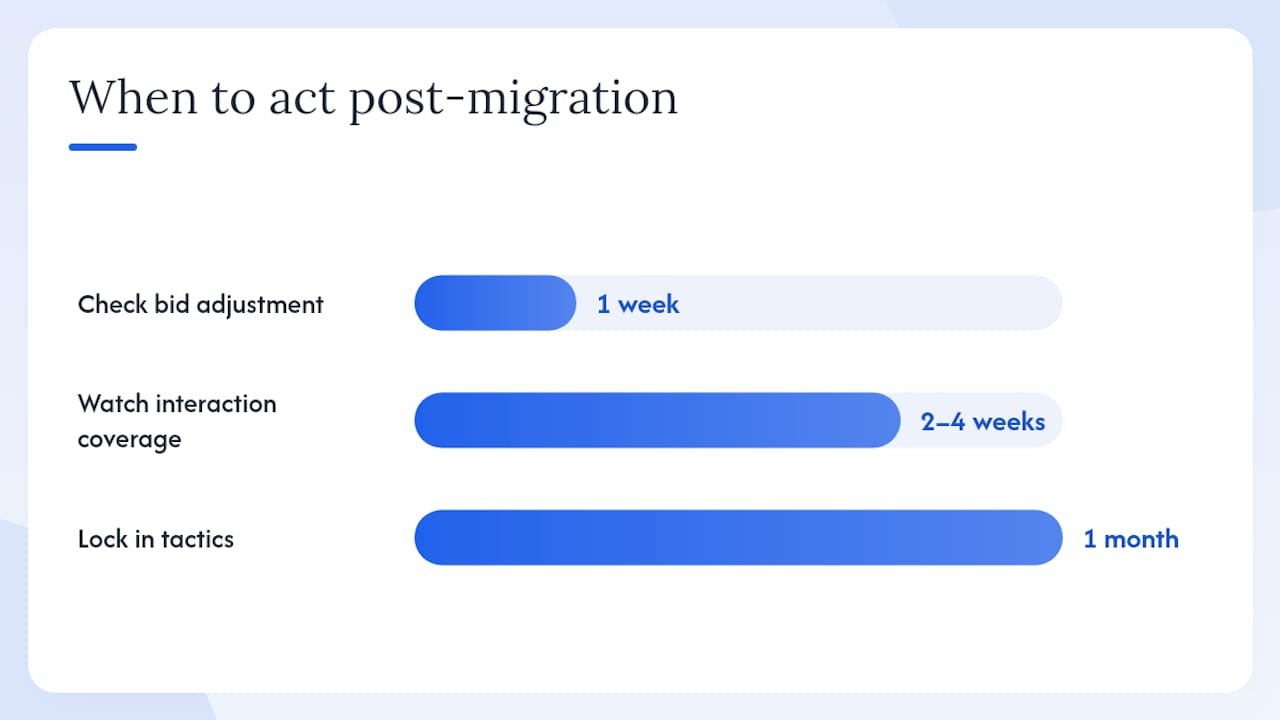
Smart Bidding works best once calls are tracked as conversions in your account, not just logged as a secondary metric. Once that’s set up, Target CPA or Maximize Conversions can bid toward calls the same way they’d bid toward a form submission or purchase. Skipping this step is a common misstep: switching to RSAs without adjusting your bidding strategy for a mixed-interaction auction often leads to underbidding on the exact interactions you care about most.
A few more tactics worth locking in during your first month post-migration:
- Align ad scheduling with your actual phone-answering hours. Running call assets overnight when nobody picks up wastes budget and creates voicemail-based “leads” that skew your data.
- Write RSA headlines and descriptions that explicitly invite a call, using phrases like “Call now for a free quote” rather than generic service copy, to reduce accidental taps from browsers who just wanted information.
- Use the Final URL and its “Visit website” link deliberately for searchers who aren’t ready to call yet, giving your landing page a job to do instead of treating it as an afterthought.
- Watch your first two to four weeks of interaction coverage closely, since that’s the window where underbidding problems typically surface.
Pro Tip: If your call volume drops in the first week after migration, check your call bid adjustment before you touch anything else. It’s the fastest lever to pull, and it’s the one most advertisers forget exists.
Measuring Call Quality: Duration Thresholds and Conversion Tracking
Not every phone call is worth the same amount to your business, and Google’s reporting tools let you filter for the calls that actually matter. Setting a minimum call duration for what counts as a conversion is the single most useful lever here.
Google recommends a starting range of 60 to 90 seconds for most businesses, though the right number depends on what you sell. A locksmith fielding an emergency call might see genuine leads wrap up in under a minute, so a lower threshold makes sense. A dental practice or a law firm handling a more involved intake conversation should push the threshold higher, since a real prospect call rarely wraps in 30 seconds.
Google’s native call reporting gives you the basics: call duration, caller area code, and whether the call came from a forwarding number set up specifically for ad tracking. For a fuller picture, layer in third-party call-tracking software and CRM integration so you can score calls by outcome, not just by duration, and import those results back into Google Ads as offline conversions.
Three metrics deserve a spot on your weekly dashboard:
- Interaction coverage: how often your call asset actually shows when your ad serves.
- Call duration distribution: whether calls cluster near your threshold or comfortably clear it.
- Call-to-close rate: the share of tracked calls that convert into paying customers, once you’ve imported CRM outcomes.
That third metric is where the real optimization happens. A campaign generating plenty of calls but a poor call-to-close rate isn’t actually performing well, it’s just generating volume. Feeding closed-deal data back into Google Ads as offline conversions lets Smart Bidding chase revenue instead of raw call count.
Common Migration Pitfalls and How to Fix Them
Most call-volume drops during migration trace back to a short list of avoidable mistakes:
- Running call assets outside staffing hours. If nobody answers, the call gets logged but the lead is lost. Fix it by matching ad scheduling to your actual phone coverage.
- Skipping phone number and Final URL verification. An unverified number or broken landing page can quietly kill an otherwise solid campaign. Test every asset before it goes live.
- Never setting a call duration threshold. Without one, every call counts as a conversion, including wrong numbers and spam, which corrupts your Smart Bidding signal.
- Leaving bidding strategy unchanged after migration. RSAs create a mixed-interaction auction that call-only ads never had, and old bids often underperform without adjustment.
Watch interaction coverage and call volume daily for the first two weeks. A sudden dip almost always traces back to one of the four issues above.
Preferic’s Take on Getting This Right
Treat this migration like an infrastructure project, not a routine ad tweak. Assign one person ownership of the timeline, set a hard internal deadline well ahead of February 2027, when existing call-only ads stop serving, and migrate your highest-volume campaigns first, not last. Waiting until the deadline approaches is how agencies end up scrambling across dozens of accounts at once.
Our approach with local service clients prioritizes high-intent local keywords over broad match terms, since a searcher typing “emergency plumber near me” is worth far more attention than one browsing generically. We also link Google Business Profile data into the campaign structure and import offline conversions from CRM systems, which gives Smart Bidding something real to optimize toward instead of raw call counts.
The businesses that come through this transition without a dip in lead volume are the ones who started early and measured constantly. The ones who wait until the deprecation deadline are the ones calling their account manager in a panic. Industry analysis backs the same conclusion: early movers keep their call volume, late movers lose it.
Get Help Migrating Your Call Campaigns Before the Deadline
There are services available that provide dedicated support for Google Ads migration, including building migration checklists, setting up call tracking, and tuning bidding around calls that turn into paying customers.
Some agencies manage this transition for local service businesses, handling call asset setup, Smart Bidding tuned on imported offline conversions, matching phone-answering hours to ad scheduling, setting call duration thresholds by business type, and prioritizing high-volume campaign migration to avoid gaps during overlap periods. If you run PPC for a plumbing, roofing, or dental practice and want this handled without babysitting it yourself, our PPC and local marketing services for plumbers in Phoenix, AZ show exactly how we structure that work. Tell us about your account and get a written plan and exact monthly price, including your migration timeline.
Sources
The facts in this guide come directly from Google’s own documentation and industry reporting on the change:
FAQ
What Is a Call-Only Ad?
A call-only ad is a Google Ads format that shows a headline and a call button instead of a clickable link, letting mobile searchers tap to start a phone call directly from the search results page.
Is Google Getting Rid of Call-Only Ads?
Yes. Google stopped allowing new call-only ads in February 2026 and will stop serving any existing call-only ads by February 2027.
Are Call-Only Ads Being Deprecated Entirely?
Call-only ads are being fully deprecated and replaced by call assets attached to responsive search ads, which offer similar click-to-call functionality plus an optional website link.
How Do I Create a Call Asset to Replace a Call-Only Ad?
Add your phone number as a call asset at the account, campaign, or ad group level, then attach it to a responsive search ad through the “More asset types” menu, following Google’s migration steps.
What Call Duration Should I Use to Count a Real Lead?
Most businesses start with a threshold of 60 to 90 seconds, adjusting lower for urgent services like emergency repairs and higher for consultative businesses like dental or legal practices.
Recommended
Want your ad budget working harder?
Preferic manages Google Ads for small and local businesses across the USA, with transparent reporting and a written plan before you spend a dollar.
Explore PPC Management