Google Ads works for small businesses that sell something with clear buyer intent and profit per sale, and can track a conversion from click to close. It fails for businesses that skip conversion tracking, send traffic to a weak landing page, or set a budget too small to learn anything. Before you spend a dollar, check two things: is your profit per conversion comfortably higher than what a lead will likely cost, and can you actually track when someone converts? If both are yes, here’s how to start, measure, and optimize.
TL;DR:
- A small business needs to ensure its profit per conversion exceeds the customer acquisition cost and that conversion tracking is correctly set up before scaling campaigns.
- Starting with search campaigns provides the clearest data for diagnosis, while performance max should only be introduced after establishing baseline results with search.
- Budgeting should be based on industry CPC benchmarks, aiming for enough clicks to generate measurable conversions within a 30 to 60 day learning window.
- Effective ad copy focuses on specific outcomes with numbers, and landing pages must closely match ad promises to improve conversion rates.
- Weekly reviews of search terms, negatives, and campaign performance are essential to sustain profitability, especially when judging results after 60 days.
Table of Contents
- Why Google Ads Can Work, and When It Fails
- Which Google Ads Campaign Type Should You Start With?
- How Much Should a Small Business Budget for Google Ads?
- Step-by-Step: Set Up Your First Measurable Campaign
- Keywords, Match Types, and Extensions That Cut Wasted Spend
- Landing Pages and Measuring Real ROI
- A Weekly Optimization Routine That Keeps Campaigns Profitable
- Setting Goals and KPIs That Actually Matter
- How to Define and Segment Your Target Audience
- Splitting Your Budget Across Multiple Campaigns
- Writing Ad Copy That Works on a Small Budget
- Local Targeting for Brick-and-Mortar Businesses
- Preferic’s Take: When to DIY and When to Bring in Help
- Get a Google Ads Plan Built for Your Business
- Sources
Why Google Ads Can Work, and When It Fails
Google Ads is a demand-capture channel, not a demand-creation one. Someone searches “emergency plumber near me” or “buy running shoes size 10,” and you show up at the exact moment they’re ready to act. That’s a fundamentally different job than a billboard or a social ad trying to interrupt someone’s scroll, and it’s why search ads convert at higher rates than most awareness formats.
The math has to work first, though. If your average job or sale is worth $50 in profit and your industry’s cost per lead runs $80, no amount of optimization fixes that gap. Google Ads rewards businesses where lifetime customer value, average order value, or job value clears the cost of acquisition with room to spare.
Most failures trace back to three causes:
- No conversion tracking, so the account optimizes for clicks instead of results
- A landing page that doesn’t match the ad’s promise, killing conversion rate
- A budget too small to generate the data needed to improve anything
Over 5 billion people are online worldwide, and 70% of small business advertisers plan to increase their digital ad spend over the next two years. That reach is real, but reach alone doesn’t pay your bills. Tracking and math do.
Which Google Ads Campaign Type Should You Start With?
Start with Search campaigns. They’re the most interpretable format available: you see exactly which keyword triggered which click, which helps diagnose problems and fix them effectively for a first-time advertiser.
If you run a service-area business, a plumbing company or a local law firm, Local Services Ads or standard Search campaigns with location targeting should sit alongside your core Search setup. Local Services Ads charge per lead rather than per click in many categories, and they display a Google-verified badge that builds trust with customers who’ve never heard of you.
Performance Max is worth holding off on. PMax pools your budget across Search, Display, YouTube, Gmail, and Maps automatically, and it performs best once Search is already dialed in and you have baseline conversion data to feed it. Turn it on too early, with no conversion history, and it can spend your budget on low-quality placements you can’t see or control, because PMax reporting hides much of the channel-level detail Search gives you for free.
Save Display and Video campaigns for later. They’re built for retargeting people who already visited your site and awareness building, not for generating a first sale. Running them before you have a working conversion funnel just burns budget on impressions you can’t tie to revenue.
Pro Tip: Run Search alone for at least 30 days before adding any other campaign type. You need a clean baseline to know whether PMax or Display actually adds incremental results later, instead of just cannibalizing clicks you’d have gotten anyway.
How Much Should a Small Business Budget for Google Ads?
Start with a simple calculation instead of a guess. If your industry’s average cost per click is $3 and you budget $30 a day, you’re buying roughly 10 clicks daily. At a conservative conversion rate, that’s roughly one lead every few days, or an estimated several leads per month, depending on exact figures. Run that math for your own numbers before you commit to a monthly figure.
- Pull your industry’s average CPC from a benchmark source and multiply by your desired daily click volume.
- Apply a conservative 2% to 4% conversion rate to estimate leads or sales per month.
- Multiply expected leads by your average close rate and profit per sale to see if the arithmetic clears your ad spend.
- Budget for at least a 30 to 60 day learning window before judging results, since Google’s algorithms need volume to optimize toward.
CPCs vary widely by industry, and benchmark reports show significant swings in average cost per click and cost per lead depending on your vertical, so check your category specifically rather than assuming a flat number.
For bidding strategy, manual CPC gives you full control while you’re still learning your account, suitable for the initial period to cap risk. Once you have a number of recorded conversions, automated Smart Bidding options, like Target CPA or Maximize Conversions, generally perform better by factoring in more signals automatically.
Step-by-Step: Set Up Your First Measurable Campaign
- Create your account the manual way. When Google Ads prompts you to build a “Smart campaign,” skip it and choose the option for experts or “create account without guidance.” Smart campaigns limit your control over keywords, bidding, and negatives.
- Decide your primary conversion event first. Is success a phone call, a form submission, or a completed purchase? Pick one primary action before you build a single ad group.
- Install conversion tracking before launch. Google’s own small-business guidance stresses wiring up conversion tracking before you launch anything, because campaigns optimize toward whatever you tell them counts as success. Skip this step and you’re flying blind.
- Link your accounts. Connect Google Analytics (GA4), your Google Business Profile, and Google Tag Manager if you’re using it. This gives you a second data source to sanity-check what Ads reports.
- Set billing, country, and time zone correctly. These can’t be changed later without disruption, so get them right at setup.
- Build your first campaign settings. Set a geographic radius that matches where you can actually serve customers, an ad schedule matching your business hours if you rely on calls, and adjust bids by device if mobile or desktop clearly performs better for your offer.
- Structure ad groups by theme. Group tightly related keywords together (three to eight per group) so each ad’s message stays relevant to the searches triggering it.
Pro Tip: Set up a phone call conversion action even if you also track form fills. Service businesses routinely get a significant share of conversions by phone, and if you’re not tracking calls, your reported cost per conversion may look artificially high.
Keywords, Match Types, and Extensions That Cut Wasted Spend
Prioritize transactional, buyer-ready terms over broad informational ones. “Emergency AC repair Phoenix” beats “how does air conditioning work” every time, because the searcher’s intent is completely different.
- Use phrase match and exact match for your core, proven terms once you know what converts.
- Keep a small, curated set of broad match keywords for discovery, but watch that spend closely.
- Pull your search terms report weekly during the first month and add irrelevant queries as negative keywords immediately.
- Layer in location modifiers (“near me,” city names, neighborhood names) for any service-area business.
- Add call extensions, location extensions, sitelinks, and callout extensions to every local or service ad, since extensions increase your ad’s visible real estate and typically lift click-through rate at no extra cost per click.
Negative keywords deserve their own habit, not a one-time setup. A landscaping company running “lawn care” as broad match will attract searches for “lawn care jobs” and “lawn care equipment for sale,” neither of which is a customer. Building that negative list from real search-term data, rather than guessing upfront, is one of the fastest ways to stop paying for clicks that were never going to convert.
Landing Pages and Measuring Real ROI
Your ad’s promise and your landing page’s headline need to match word for word, or close to it. If the ad says “Same-Day AC Repair,” the landing page headline shouldn’t say “Welcome to Our HVAC Company.” That mismatch alone can cut conversion rate significantly, because it forces the visitor to hunt for confirmation they clicked the right link.
A landing page built to convert needs:
- One clear call to action above the fold, not three competing options
- Trust signals visible immediately: reviews, licensing, years in business, or guarantees
- Fast load speed, since delays past a few seconds cause visible drop-off on mobile
- A form or phone number that’s impossible to miss on a phone screen
Verify your conversion events actually fire before you trust any report. Click through your own ad, complete the form or call the number, and confirm it registers in both Google Ads and GA4. Businesses that skip this step often under-invest in tracking and never catch the gap between reported and real conversions, which quietly inflates cost-per-conversion numbers for months.
Each week, review CPC, conversion rate, and cost per conversion. Each month, step back and check ROAS (return on ad spend) against your actual profit margins, not just your revenue, since a healthy-looking ROAS can still lose money on thin margins.
A Weekly Optimization Routine That Keeps Campaigns Profitable
- Every week: Pull the search terms report and add negatives, pause keywords and ads with high spend and zero conversions, and confirm your conversion count matches reality.
- Every month: Shift budget toward the campaigns and ad groups producing your lowest cost per conversion, test new ad copy variations against your current winners, and revisit whether manual or automated bidding still fits your data volume.
- Every quarter: Reassess campaign types entirely, whether it’s time to test Performance Max, add Display retargeting, or expand geographic radius.
The most common mistakes are avoidable. Set-and-forget accounts drift toward waste within weeks. Under-tracking hides which campaigns actually deserve more budget. Budgets too small to exit the learning phase get judged (and killed) before they had a fair chance. And unmonitored Performance Max campaigns can quietly cannibalize branded search traffic you were already getting for less.
Pro Tip: Judge results after 60 days, not 7 to 14. A short evaluation window is the single most common reason small businesses wrongly conclude Google Ads doesn’t work for them, when the real issue was judging too early.
Setting Goals and KPIs That Actually Matter
Before you set a budget, define what winning looks like in numbers, not vague hopes. “More website traffic” isn’t a goal; “20 booked appointments per month at under $60 cost per booking” is.
Every small business account needs three tiers of KPIs. Volume metrics (clicks, impressions, conversions) tell you whether you’re generating enough activity to learn anything. Efficiency metrics (cost per click, cost per conversion, conversion rate) tell you whether that activity is affordable. Outcome metrics (return on ad spend, actual revenue or booked jobs) tell you whether the whole exercise is worth continuing.
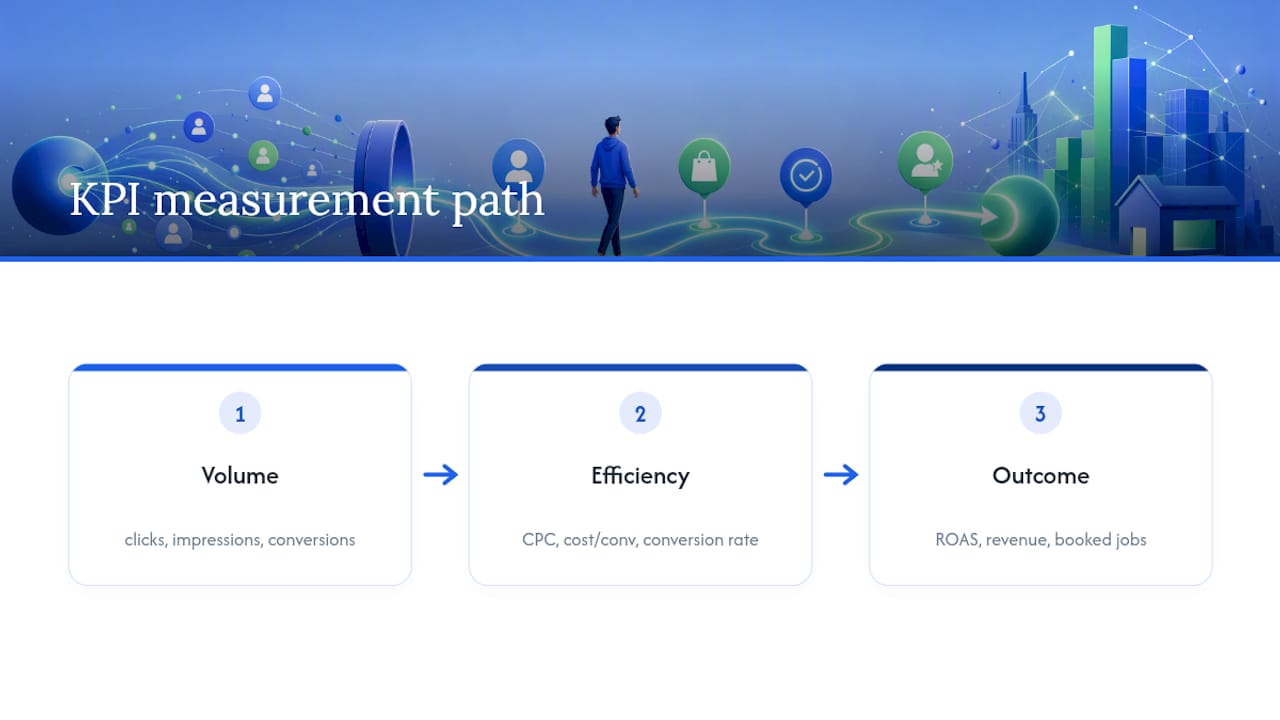
Set your target cost per conversion before launch, based on the budgeting math from earlier, not after you see disappointing early numbers. A moving target makes every result look acceptable in hindsight, which defeats the purpose of tracking at all.
Review goals quarterly, not just campaigns. A goal that made sense when you had capacity for 10 extra jobs a month doesn’t make sense once you’re booked solid; at that point, the KPI to optimize might shift from lead volume to lead quality or average job value instead.
How to Define and Segment Your Target Audience
Google Ads gives you three real levers for audience targeting: who someone is, what they’re interested in, and what they’ve already done on your site.
Demographic targeting (age, household income, parental status) works best as a narrowing tool, not a primary targeting method, since search intent from keywords already does most of the heavy lifting. Use demographics to exclude segments unlikely to buy rather than to build your whole strategy around them.
Interest and in-market audiences let you layer signals on top of Display or Video campaigns, flagging people actively researching categories related to your product. This works well for awareness-stage campaigns but adds little value to a bottom-funnel Search campaign where the keyword itself already signals intent.
Remarketing is the highest-value segment for most small businesses, and it’s frequently underused. Anyone who visited your site without converting is a warmer prospect than a cold searcher, and a remarketing campaign showing them a specific offer or reminder often converts at a noticeably lower cost per conversion than cold traffic. Build this audience from day one, even if you don’t activate a remarketing campaign for a few months, since Google needs time to accumulate the list.
Splitting Your Budget Across Multiple Campaigns
If you sell more than one service or product line, resist the urge to split your budget evenly across everything at once. Put the majority of early spend behind whichever offer has the clearest profit math and the most existing proof (past sales, strong reviews, established pricing).
Once that first campaign has 30 or more conversions and a stable cost per conversion, use it as your benchmark. A second campaign for a different service or product line only earns budget if it can plausibly hit a similar or better number, otherwise you’re diluting the account’s total performance to fund a hunch.
Never split evenly by default just because you offer two things; let the arithmetic from your KPI review decide the ratio, not a sense of fairness between product lines.
Writing Ad Copy That Works on a Small Budget
Every dollar of ad spend rides on your copy earning the click and setting the right expectation, so vague, feature-heavy headlines waste both the click and the impression that produced it.
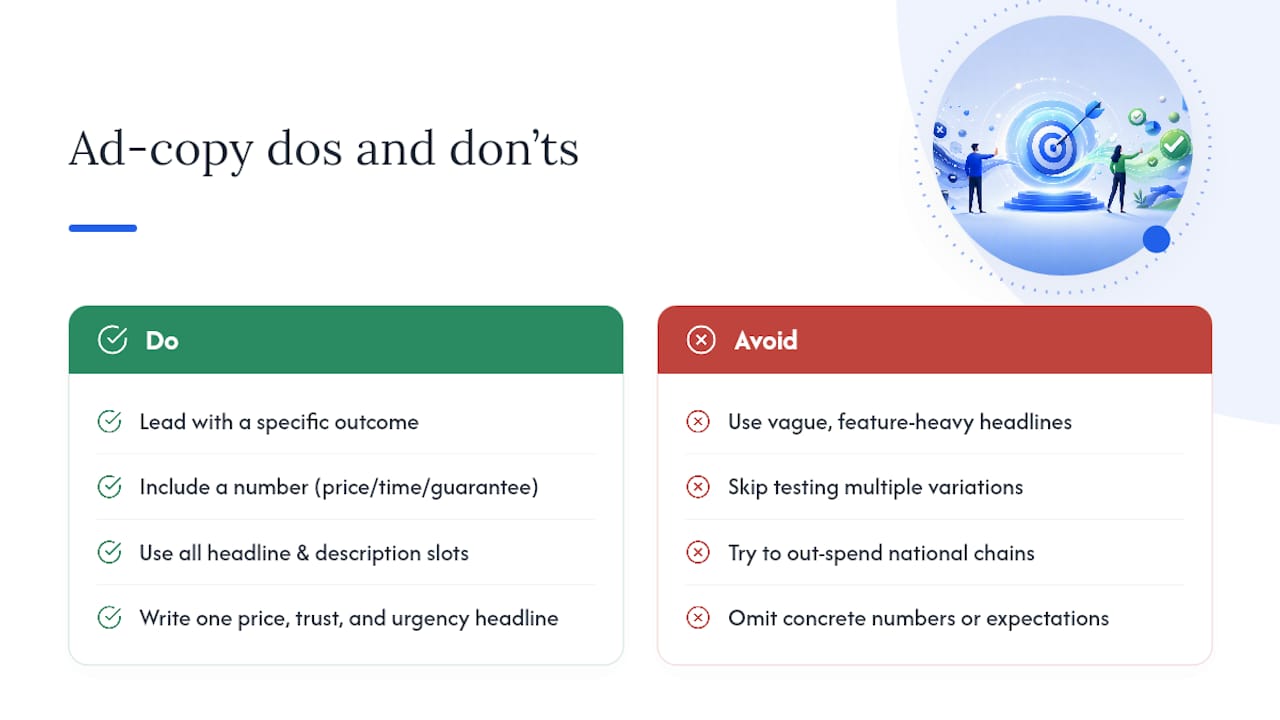
Lead with the specific outcome, not the category. “Same-Day AC Repair, No Overtime Fees” outperforms “Professional HVAC Services” because it answers the searcher’s actual question before they even click. Include a number where you can: a price, a turnaround time, a guarantee length. Numbers stop the scroll and set concrete expectations that match your landing page.
Use all available headline and description slots; Google’s responsive search ads let you input up to 15 headlines and 4 descriptions, and testing several variations lets the algorithm find the combination that earns the highest click-through rate for your specific audience. Write at least one headline focused purely on price or offer, one on trust (licensed, insured, years in business, review count), and one on urgency or availability, then let performance data tell you which resonates.
Match your copy’s tone to your budget reality. A small business competing against national chains shouldn’t try to out-spend them on brand messaging; it should out-specific them with local proof, faster response times, or a guarantee the bigger competitor can’t offer at scale.
Local Targeting for Brick-and-Mortar Businesses
If customers have to physically walk into your location, your entire account should be built around proximity and local proof, not broad reach.
Set your geographic radius tightly around your actual service area, not your state or metro area by default. A bakery pulling customers from a 5-mile radius wastes money bidding on searches from across town where no one will actually drive in. Layer location extensions onto every ad so your address, hours, and a map link appear directly in the ad itself.
Your Google Business Profile and Google Ads account should work together, not separately. A complete, actively managed profile with recent photos, accurate hours, and responded-to reviews improves how your ads and your organic map presence both perform, since Google increasingly blends signals across paid and local results for “near me” searches. Local Services Ads, where available for your category, add a verified badge and often a pay-per-lead model that reduces risk compared to standard pay-per-click, since you’re only charged when someone actually reaches out.
Preferic’s Take: When to DIY and When to Bring in Help
A data-driven setup, transparent reporting, and dedicated account manager approach can be applied to Google Ads, tailored for small and local businesses. Running your own account makes sense when you have the time to check it weekly and the patience for the 30 to 60 day learning curve. Hiring help makes more sense once you’re scaling across several campaigns, need PPC and SEO working together, or simply don’t have the bandwidth to do the weekly pruning that keeps an account profitable.
— Deepak
Get a Google Ads Plan Built for Your Business
Outsourcing Google Ads management can provide a dedicated account manager, transparent monthly reporting, and a data-driven approach to budgets and bidding, without the overhead of a full-time hire or the trial-and-error cost of learning Google Ads independently.
For local service businesses like plumbing, roofing, dental, or similar trades, campaign structure and targeting vary by category and market, and decisions should be based on actual numbers rather than generic templates. The team already applies this approach to organic and local search for clients like the plumbing companies in Denver and Phoenix it works with, and the same account-management model extends to paid search.
Check out Preferic’s small business services to see current plans, or request a quote to get a Google Ads plan built around your specific budget and goals.
Sources
- Getting started with Google Ads: Tips for small businesses — Google Blog
- How to Run Google Ads in 2026 (Step-by-step) — WordStream
- Maximum Impact: How Digital Ads Level the Playing-Field for U.S. Small Businesses — Connected Commerce Council
- Are Google Ads Worth It? An Honest 2026 Take for Small Businesses — Hyperfx